BTW, you will probably need a song for this reading:
Mobile modules
These modules exist in different form factors (LGA, PCIe, and PCI-SIG M.2) depending on supported slots and the modularity chosen for the connected object.
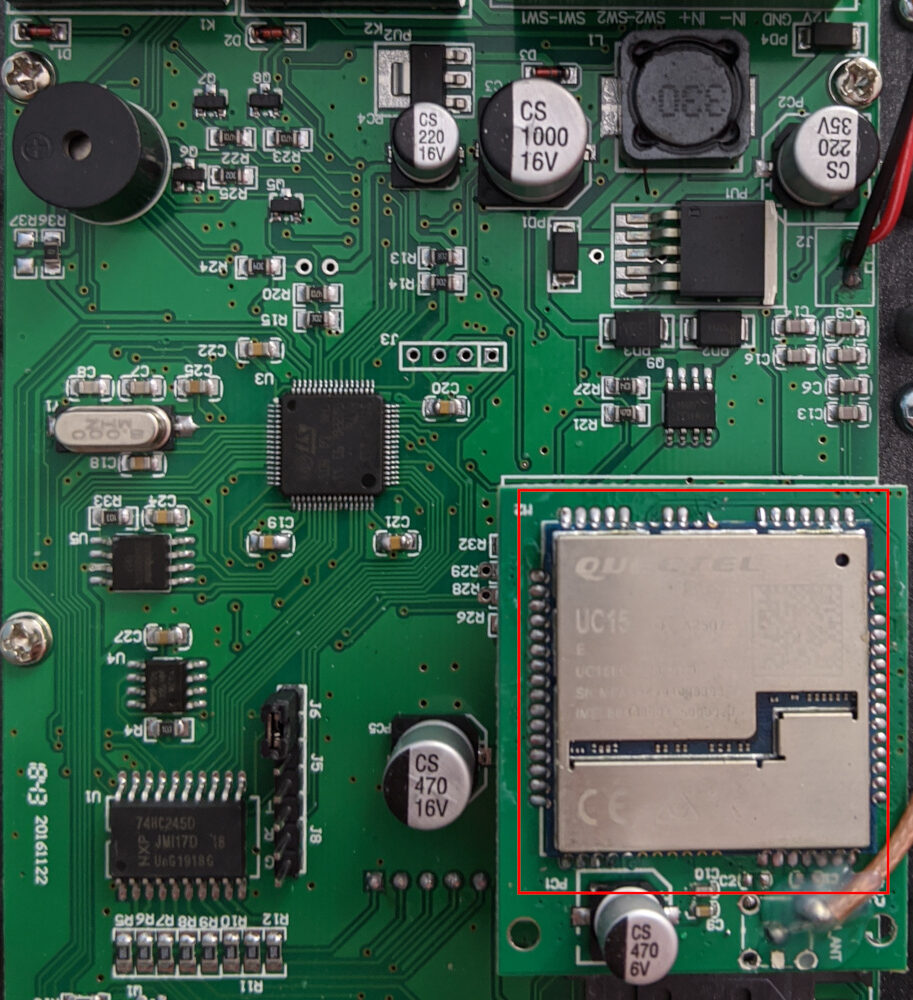
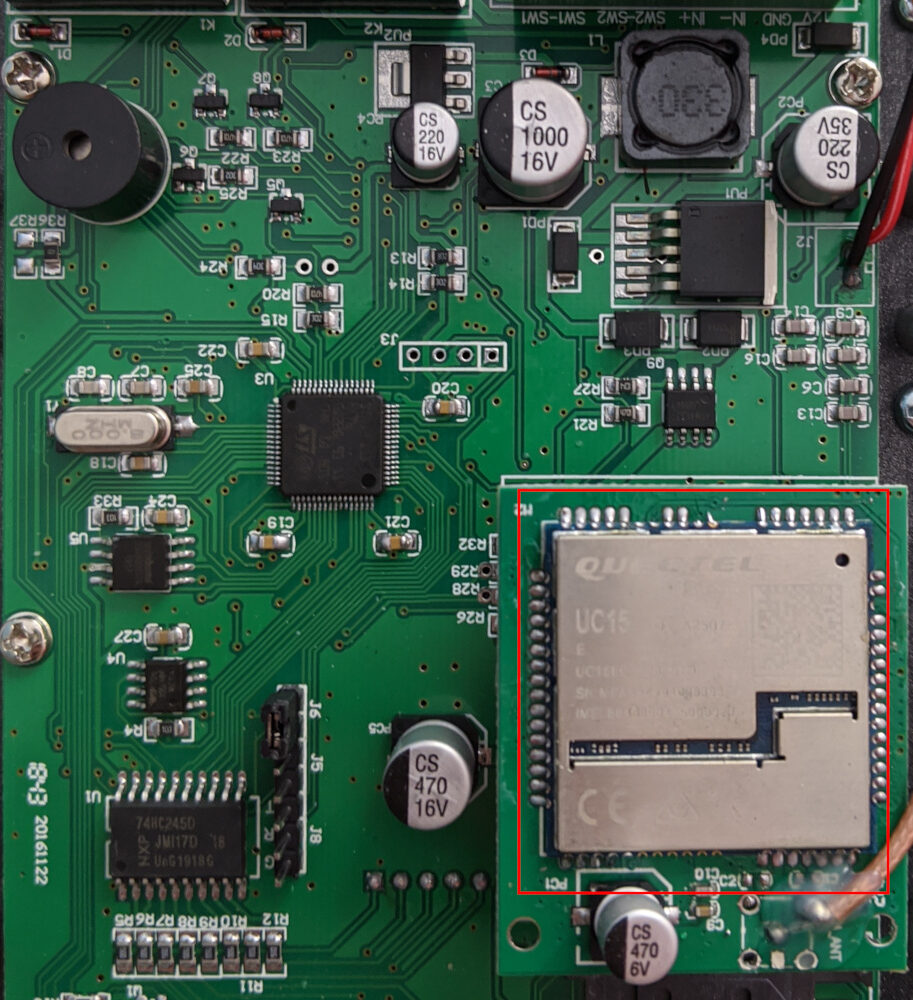
A view of a naked module like the EC20 can be observed in the following picture:
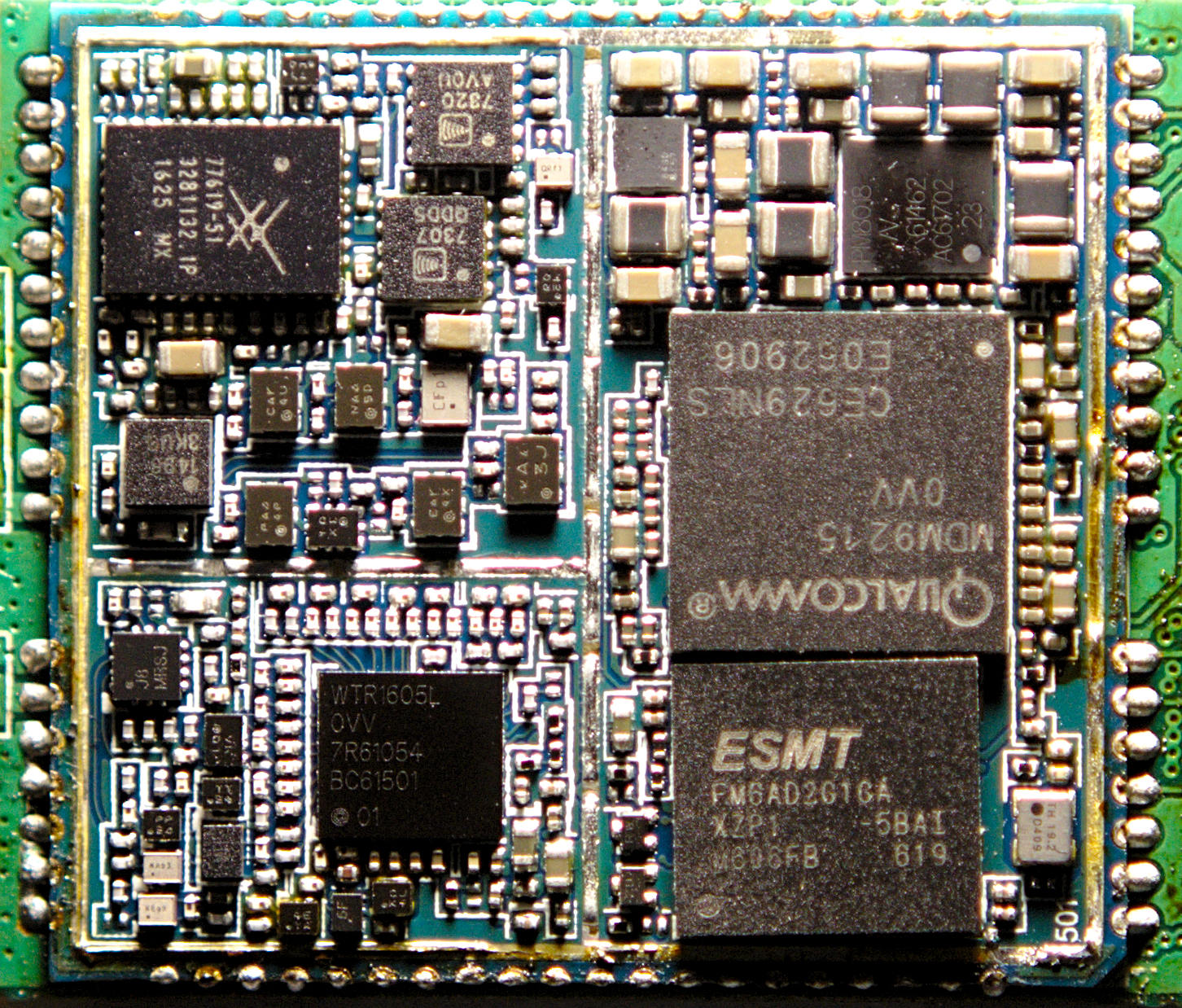
Mobile modules include the following components:
- an application processor;
- DRx and PRx frontends with adapted antennas;
- a baseband processor;
- but also a NAND and DDR memories, a PMIC (RTC), I/O interfaces, etc.
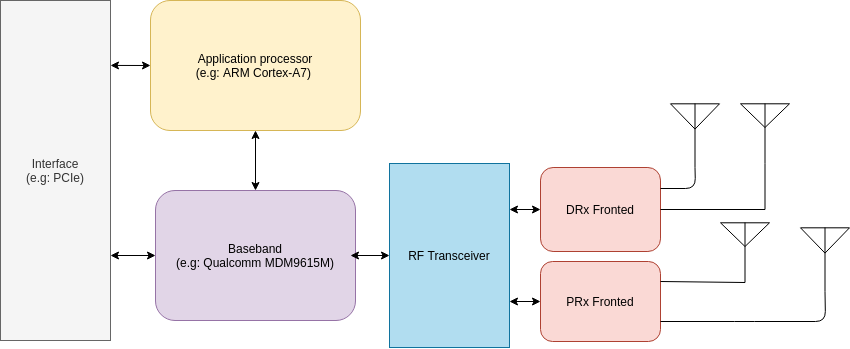
The baseband is used to process signals to receive and transmit data over the radio using a specific mobile stack to communicate. In this context, the on-chip application processor provides many features, including the implementation of the USB devices you can see on the host by connecting the module to a PC (e.g: /dev/ttyUSBx). Harald Welte and the Osmocom team showed that an OE based Linux lso runs on some mobile modules, such as the Quectel EC20.
Among the devices exposed by the module, some can be used to communicate with AT command; others can also tell DIAG interface to talk with the baseband (see xgoldmon and diag-parse projects for XGold and Qualcomm modems, respectively).
For further information, please find some interesting resources from Osmocom about Cellular modems like the Quectel EC20.
Firmware Updates
To delight customers with the latest version and new features but also provide fixes to used modules, vendors generally support two types of firmware update methods:
- wireless delivery via FOTA by default;
- through the serial line.
These updates also avoid costly product recalls in case of a severe mobile baseband or a user software defect.
Vendors generally provide customers a utility to update the firmware and link to the latest release binaries for the serial line update. This utility can be run against an exposed USB/USIF interface from the mobile module to the host to update the firmware.
These utilities use a proprietary protocol that generally goes into different steps:
- checking current version;
- restarting the device;
- entering the boot mode;
- then reading the stream and uploading it to update the module.
Here is a sample of these steps from the pseudo-code of one of the disassembled utilities retrieved with Ghidra:
[...]
      if (pcVar3 == (char *)0x0) {
        dbg_print(1,"Current firmware is up to date. Nothing to do.n");
        close(fdStream);
        destroyDevice(dev);
                    /* WARNING: Subroutine does not return */
        exit(0);
      }
    }
  }
  if (boot_delay != 0) {
    setBootDelay(dev,boot_delay);
    dbg_print(1,"Forced boot delay %d msn",boot_delay);
  }
  if ((0 < deviceSpeed) && (usb_flag == 0)) {
    setDeviceSpeed(dev,(uint8_t)deviceSpeed);
    dbg_print(1,"Setting device speed %dn",deviceSpeed);
  }
  if (restart_needed != 0) {
    if (atDevice[0] == '') {
      manage_failure(&fdStream,"No at channel found for restarting the modemn");
    }
    cmd = (char *)(*dev->_vptr.Device[4])();
    if (cmd == (char *)0x0) {
      manage_failure(&fdStream,"*** Device does not support shutdownn");
    }
    dbg_print(1,"*** Restart device: %sn",atDevice);
    fd = open_device(atDevice);
    if (fd == -1) {
      manage_failure(&fdStream,"*** unable to open the device for restartn");
    }
    cmd = (char *)send_verify(fd,cmd,"OK",read_buffer,0x100);
    if ((int)cmd < 1) {
      manage_failure(&fdStream,"*** error response to AT commandn");
    }
    close(fd);
  }
  uVar4 = (*dev->_vptr.Device[1])(cmd,deviceName);
  if (((uVar4 ^ 1) & 0xff) != 0) {
    manage_failure(&fdStream,"*** Error entering boot moden");
  }
  uVar4 = (*dev->_vptr.Device[2])();
  if (((uVar4 ^ 1) & 0xff) != 0) {
    manage_failure(&fdStream,"*** Error uploading streamn");
  }
  tVar5 = time((time_t *)0x0);
  dbg_print(1,"Elapsed time: %lu secondsn",tVar5 - tVar2);
  cmd = getStreamSwVersion(dev);
  dbg_print(1,"*** Stream uploaded successfully, installed version %sn",cmd);
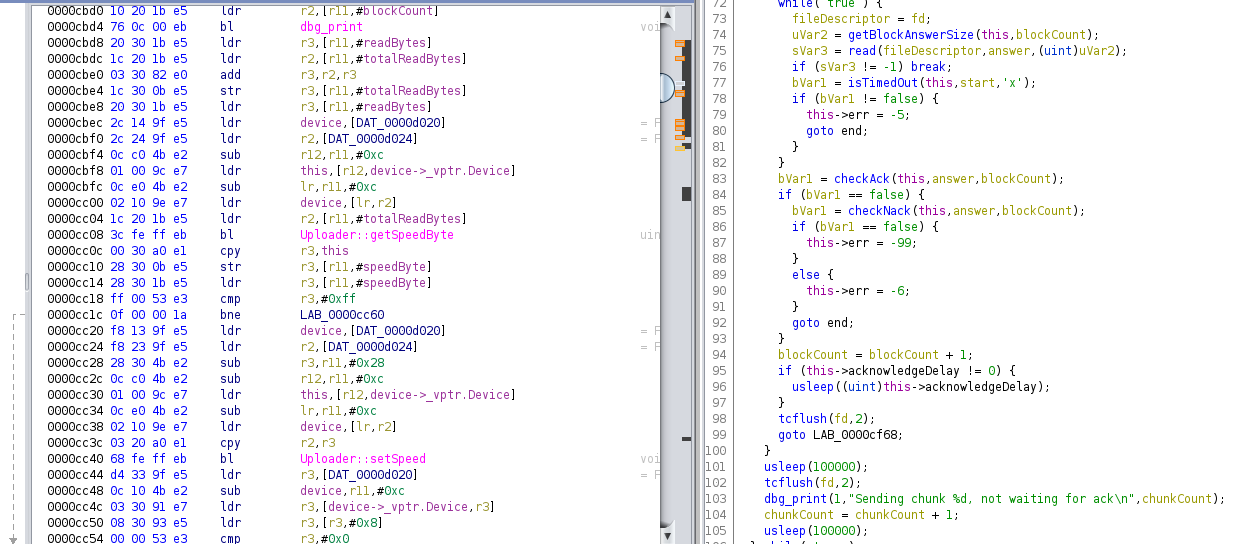
The protocol used by the vendor allows us to upload but could also implement a download feature or any reading primitive that could be used to leak the current firmware. If we can get an update or retrieve the current firmware from a mobile module, we can start studying it.
Over-The-Air Updates
Firmware Over-The-Air update, knowns as FOTA update, is a solution used by many embedded devices to remotely (over-the-air) update firmware on the device. In the case of embedded mobile modules, devices use the mobile network in GPRS/3G/4G or 5G depending on available mobile stacks.
A FOTA update is generally/commonly present in the form of a delta package that was generated by a computer with the role of a FOTA Update Generator. The generator creates a device image and its filesystem where we can find:
- configuration data;
- settings;
- system status;
- and plenty of other information.
The generated delta package contains only the changes (delta) between source and target firmware versions, guaranteeing a small and efficient update file to be downloaded.
The format of the delta package has already been documented by in the Osmocom: EC20/EC25 Delta Firmware over the air (DFOTA) upgrades page, and consists of several nested parts and pointers/offsets into it:
- Part1 with current update:
- CRC32 + len
- Common header
- Information of decompressed size of TableOfContents (TOC), offset for info within TOC
- Information of different amount of updates (diffs, inserts, removals, links, etc.)
- Variable part depending on above information (e.g. old and new CRC32 of files, unused data for insert, unknown for other)
- LZMA TableOfContents (TOC) (needs to have uncompressed size in the header and no end-of-payload marker)
- Starts with null terminated filenames to patch
- List of file permissions (separated by 0xAF)
- Information about updates (common header points to this offset). For inserts includes filesize, offset for permission, compressed size of update)
- LZMA of Insert (same requirement as above)
- Maybe some padding.. unknown about when to insert it
- Part2 with FileNamesTable:
- CRC32 + len
- Common Information
- Len + null terminated string
The delta package is sent to different devices using a dedicated communication protocol. Generally, the firmware is pulled from a device management client in HTTP/HTTPS using the OMA DM (Open Mobile Alliance Device Management) standard. This protocol is supposed to provide all the management aspects of the software update process, including crucial security functionality. Different objects are used in this OMA-DM protocol:
- FUMO (Firmware Update Management Object) allows to remotely updating firmware on a device;
- SCOMO (Software Component Management Object) remotely manages software components on a machine;
- LAWMO (Lock and Wipe Management Object) that remotely lock and/or wipe a device.
An example of the service process for a client-initiated FOTA can be found as follows:
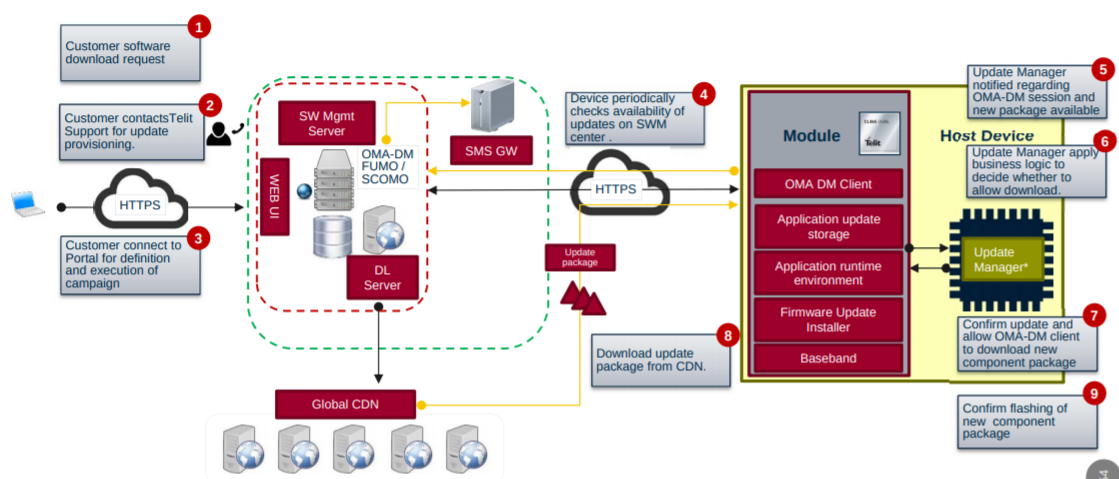
To manage mobile modules, vendors generally use SaaS solutions that can scale the number of devices requesting an update and identify essential changes and be used out of the box by those different modules.
Quick observations
OMA DM configurations
When extracting OMA DM configurations, we are already able to identify some flaws but also interesting resources that an attacker can use against device management services.
Indeed, we can have some details of the configuration and see that is meant for FOTA update using the OMA DM client:
<rdmtree><version>1.02</version>
<node>
[...]
<name>FwUpdate</name>
<get/>
<acl>Add=*&Delete=*&Exec=*&Get=*&Replace=*</acl>
<node>
<name>Flash</name>
<add/><exec/><get/><replace/>
<type>urn:oma:mo:oma-fumo:1.0</type>
<leaf>
<name>State</name>
<get/><replace/>
<format>int</format>
<value>50</value>
</leaf>
<node>
<name>DownloadAndUpdate</name>
<exec/><get/>
<leaf>
<name>PkgURL</name>
<get/><replace/>
<format>chr</format>
<value></value>
</leaf>
[...]
Other parts also tell us about the different endpoints for synchronization and downloading a new firmware binary:
  <node>
    <name>DMAcc</name>
    <permanent/><get/>
    <node>
      <name>synchronica</name>
      <add/><copy/><delete/><get/><replace/>
      <node>
        <name>AppAddr</name>
        <add/><copy/><delete/><get/><replace/>
        <node>
          <name>APPSRV</name>
          <add/><copy/><delete/><get/><replace/>
          <leaf>
            <name>Addr</name>
            <copy/><delete/><get/><replace/>
      <value>http://**********/****ml/dm</value>
          </leaf>
          <node>
            <name>Port</name>
            <add/><copy/><delete/><get/><replace/>
            <node>
              <name>Port</name>
              <add/><copy/><delete/><get/><replace/>
              <leaf>
                <name>PortNbr</name>
                <copy/><delete/><get/><replace/>
                <value>80**</value>
              </leaf>
            </node>
          </node>
          <leaf>
            <name>AddrType</name>
            <copy/><delete/><get/><replace/>
            <value>URI</value>
          </leaf>
        </node>
      </node>
   [...]
We can notice that HTTP is used here instead of HTTPS. So we can imagine that a fake GPRS station could intercept these requests if this protocol stack is enabled. Nevertheless, in this post, we will not focus on interception attacks to backdoor these modules but on requested endpoints.
Moreover, we can also retrieve BASIC Auth secrets to be used against endpoints for synchronization or to get binaries as follows:
         <leaf>
            <name>AAuthData</name>
            <replace/>
            <format>bin</format>
            <value>q****************==</value>
          </leaf>
          <leaf>
            <name>AAuthSecret</name>
            <replace/>
            <value>fota</value>
          </leaf>
          <leaf>
            <name>AAuthType</name>
            <copy/><delete/><get/><replace/>
            <value>BASIC</value>
          </leaf>
          <leaf>
            <name>AAuthName</name>
            <copy/><delete/><get/><replace/>
            <value>synchronica</value>
          </leaf>
          <leaf>
            <name>AAuthLevel</name>
            <copy/><delete/><get/><replace/>
            <value>SRVCRED</value>
          </leaf>
        </node>
        <node>
          <name>CLIENT</name>
          <add/><copy/><delete/><get/><replace/>
          <leaf>
            <name>AAuthData</name>
            <copy/><delete/><get/><replace/>
            <format>bin</format>
            <value>e****************==</value>
          </leaf>
To go further, we could request identified endpoint URLs to get an idea of the used technologies.
Endpoints as primary targets
By simply querying endpoints identified in the configuration, we could obtain the version of using frameworks that are obsolete and vulnerable to multiple flaws:
- Leaks in dedicated
statuspages - authentification bypass management interfaces with a simple verb tampering vulnerability;
- and Remote code execution or malicious application deployment through management interfaces.
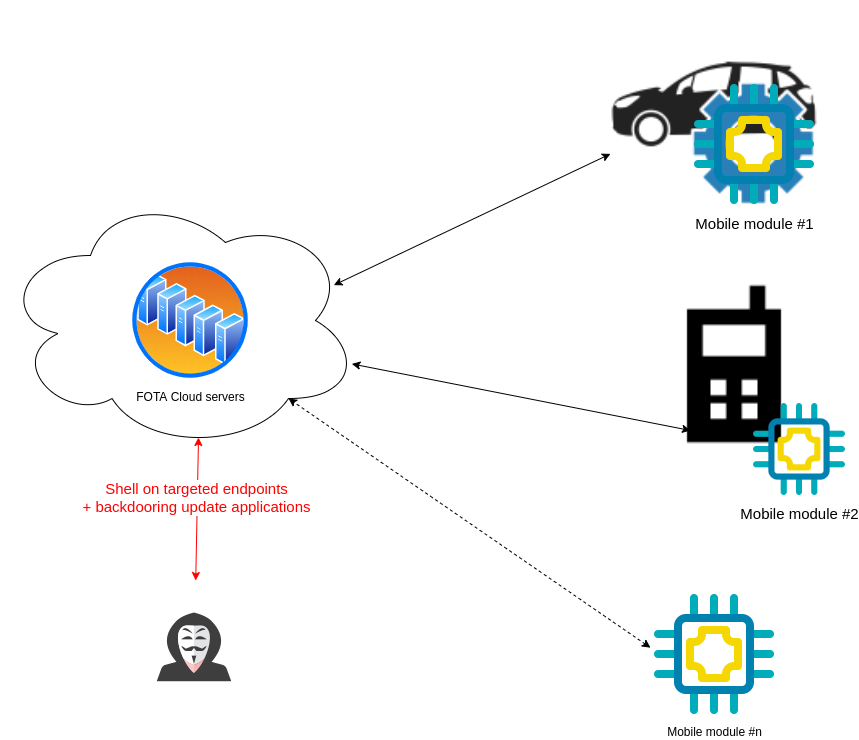
So by targeting those endpoints, an attacker would be able to backdoor every FOTA update request and craft its configuration as follows for automotive ECUs:
<flashjobConfig xmlns:xsi="http://www.w3.org/2001/XMLSchema-instance" ecuName="SEAT_****" schemaVersion="1.0.0" xsi:noNamespaceSchemaLocation="config.xsd">
    <config name="Development">
        <variantPatterns>
            <variantPattern>
                <matchService>
                    <matchParameters>
                        <matchParameter value="0****"/>
                    </matchParameters>
                </matchService>
            </variantPattern>
        </variantPatterns>
        <swils>
            <swil downloadSequence="0" logicalBlockId="0" startAddress="******" swilFile="Flash***.bin">
                <crc>0x**, 0x**, 0x**, 0x**</crc>
            </swil>
        </swils>
<security>***********.pgp</security>
        <usedSecurityElement>*******</usedSecurityElement>
        <securityClass>NONE</securityClass>
        <fblRevision>REV_***</fblRevision>
    </config>
It should also be noticed that depending on rights retrieved while exploiting remote commands on these endpoints.
Conclusion in short
FOTA Device management services are the perfect target for attackers who want to backdoor a large set of mobile modules simultaneously without any mobile interception attack on the radio. To perform the attack, it is only required to get a list of those endpoints and exploit public vulnerabilities associated with the identified version of frameworks used by device management endpoints.
Mobile module vendors must consider the risks of a compromise that could be performed on third-party services, especially when those services are responsible for firmware distribution.
We scope the engagement with you, then send a fixed-price proposal.